
24 best AI tools for HR in 2026
15/10/2026 • AI in HR • 15 min read
In this article
AI tools for HR now cover almost every part of the People function, from drafting a review to answering a payroll question at midnight. The range makes choosing harder. In our survey of 100 US People leaders (stratified sample, fielded June 2026; figures are directional), 43% said their team already runs three or more separate AI tools, and 22% run six or more.
This list groups 24 tools by the job they do, in the order of the problems People leaders told us they're trying to solve with AI: improving performance (54% mention it), then hiring and onboarding (48% each). For each tool we cover what it is best for, its main AI features and its pricing. At the end you'll find the free options and where they stop, a scorecard for choosing, and a checklist to run before any tool touches employee data.
What counts as an AI tool for HR?
An AI tool for HR is software that uses AI models to do part of an HR task: drafting, summarising, screening, answering questions or completing actions in HR systems. They fall into four groups: agentic AI platforms that act across systems, AI inside an HR platform, specialist tools for one HR function, and general assistants such as ChatGPT or Claude.
Each group suits different work. AI inside your HR platform works from your live employee data and permissions. A specialist tool goes deeper on one job, such as interview notes or performance reviews. An AI agent completes tasks across several systems. A general assistant is flexible and inexpensive, and knows nothing about your company until you tell it.
The 24 tools at a glance
# | Tool | Best for | Starting price |
|---|---|---|---|
1 | Athena | Agentic AI for HR operations: helpdesk, onboarding, offboarding and reporting | On request |
2 | Kinfolk | An AI agent for HR requests in Slack and Teams | Flat annual plan by headcount tier |
3 | Leena AI | Enterprise HR service desk | On request |
4 | Moveworks | Enterprise employee support across IT and HR | On request |
5 | Humaans | An HRIS with AI for questions, survey comment summaries and an MCP | On request |
6 | Rippling | AI across HR, payroll, IT and finance on one platform | From $8 per employee per month plus base fee |
7 | Personio | All-in-one HR for European mid-market companies | On request |
8 | Lattice | Performance reviews and engagement | $10 per person per month for Performance |
9 | Culture Amp | Engagement surveys and feedback | On request |
10 | 15Five | Performance and manager coaching | $4 per person per month (Engage) |
11 | Leapsome | Performance, learning and HR helpdesk | From €4 per employee per month by module |
12 | Ashby | Recruiting teams that want one ATS | From $400 per month (up to 100 employees) |
13 | Greenhouse | Structured hiring at scale | On request |
14 | Metaview | Interview notes and recruiting admin | Free Notetaker plan |
15 | Textio | Job posts and performance feedback | On request |
16 | Paradox | High-volume frontline hiring | On request |
17 | Eightfold AI | Enterprise talent matching | On request |
18 | Enboarder | Onboarding journeys | On request |
19 | Sana | AI-built courses and personalised learning | Per user, from 300 users |
20 | Guru | A verified knowledge base for employee answers | On request |
21 | ChatGPT | Drafting and analysis | Free; Business from $20 per user per month |
22 | Claude | Long documents and policy work | Free; Team from $20 per user per month |
23 | Microsoft 365 Copilot | HR teams working in Microsoft 365 | $30 per user per month |
24 | Google Gemini | HR teams working in Google Workspace | Basic in Business Starter; full from Business Standard |
Agentic AI for HR
Agentic AI platforms for HR use AI agents to answer employee requests, route them and complete the work behind them in the HR system and the tools around it. They sit on top of the HRIS a company already runs, act within its permissions, log every action and pass anything that needs judgement to a person.
1. Athena
Best for: People teams that want one agentic AI platform to run HR operations end to end, from the helpdesk to onboarding, offboarding and reporting.
Athena is an agentic AI platform: a set of AI agents that answer employee requests, route them and complete the work behind them across HR, IT and finance operations. It sits on top of the tech stack companies already run, including Workday, and works seamlessly with any system of record, so there is nothing to migrate. Employees use it in Slack, Microsoft Teams or on the web.
Helpdesk: Answers policy questions on PTO, parental leave, expenses and benefits, processes leave requests, updates addresses, bank details and emergency contacts, and resets passwords in Google, Okta and Slack.
Onboarding: Sends the employment contract from the ATS for e-signature, sends onboarding communications, collects new-hire documents and runs 30, 60 and 90-day check-ins.
Offboarding: Coordinates leaver steps across HR and IT, such as logging equipment returns.
People and culture: Runs eNPS surveys and promotion cycles, recognises anniversaries and compiles review drafts.
Reporting: Its data analyst agent produces headcount reports, absence trends and compliance snapshots on request, and Athena tracks and chases probation reviews, compliance deadlines and document expiry dates.
When a request needs a person, Athena routes it to the right person or team with the context attached. Every action is logged as a step in a case and can be reversed, and sensitive actions can require approval. Athena is SOC 2 Type II and ISO 27001 certified.
At Plaid, which runs Athena over Workday, Zendesk and Google Workspace, more than half of employees used Athena in its first month, it completed around 800 actions, and 97 to 98% of employee questions were resolved without escalating to the People team. 32% of conversations arrived outside standard business hours.
Pricing: On request.
2. Kinfolk
Best for: Mid-market and growth-stage companies that want an AI agent to resolve HR requests in Slack or Microsoft Teams.
Kinfolk's agent, Kin, answers employee questions in Slack and Microsoft Teams, citing the source of every answer, and routes requests to separate queues for People Ops, payroll, benefits and employee relations. Teams can build their own runbooks from process documents, and Kin's People Ops Auditor flags issues such as unsigned documents, expiring right-to-work checks and mismatched records, each with a proposed fix.
Pricing: One flat annual plan based on headcount tiers, with unlimited users and conversations. The Core plan is read-only in the HRIS; write-back requires the Plus plan. Prices on request.
3. Leena AI
Best for: Large enterprises that want an AI service desk for HR.
Leena AI's AI colleagues answer employee questions and handle HR operations tasks across enterprise HR systems, and its studio lets teams build their own.
Pricing: On request.
4. Moveworks
Best for: Enterprises that want one assistant for IT, HR and other employee support.
Moveworks provides an AI assistant and enterprise search across HR. ServiceNow completed its acquisition of Moveworks in December 2025, and its HR capabilities are now offered alongside ServiceNow's employee service products.
Pricing: On request.
AI in your HR system
AI in your HR system answers from your live employee records and follows the permissions already set there, which makes it a practical place to start for questions about headcount, time off, compensation or reporting. An AI agent connected to that system can also complete requests on an employee's behalf.
5. Humaans
Best for: For mid-market companies that want an best-in-class HRIS with AI built into everyday HR work.
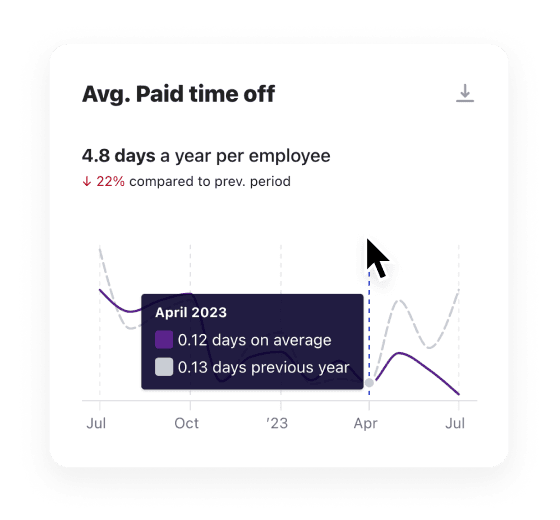
AI Companion. Employees and managers ask questions about people, policies, time away, compensation and more in plain language, and get answers as text, sortable tables or charts. Answers are limited to what each person is allowed to see in Humaans, can cite the document they came from.
AI Employee Engagement. AI summarises open-text survey comments into the main recurring themes, updated as new comments arrive, so People teams can see what employees are raising without reading every response.
Humaans MCP. Connect AI assistants such as Claude, ChatGPT, Cursor and Copilot Studio to Humaans. Within each person's existing role, those assistants can look up profiles and reporting lines, request and approve leave, update job or compensation details, start workflows such as onboarding or review cycles, and send documents for e-signature.
Workflow AI also builds and edits onboarding and offboarding workflows from a chat or an uploaded document.
Humaans also supports customers strategy and roadmap, including AI strategy: identifying which HR processes and questions to start with, setting up the workflows or AI Companion, engagement surveys and the MCP around those priorities, and helping the team put the plan into practice. Support is available by live chat, Slack and email, and all customers have a dedicated implementation and customer success manager.
Pricing: On request.
6. Rippling
Best for: Companies that want HR, payroll, IT and finance on one platform, with one AI assistant across that data.
Rippling AI answers questions across Rippling's HR, payroll, IT and finance products, and turns answers into charts, reports and dashboards. It runs on existing Rippling permissions, and every action it proposes requires explicit human confirmation before it runs. Names and numbers in its answers link to the source records. Teams can turn workflows they repeat into AI skills and share them by role or location.
Pricing: Plans start at $8 per employee per month plus a monthly base fee, priced by the modules you buy.
7. Personio
Best for: European mid-market companies that want an all-in-one HR platform with payroll and recruiting.
Personio Assistant answers questions about people, time off, compensation and recruiting data in plain language, breaks down headcount and turnover by department, office or team, and produces downloadable charts and summary notes. It also answers routine employee questions about policies, time off and documents, and applies each user's Personio permissions. Personio states that Assistant data is stored in Frankfurt, stays in the EU and is not used to train models. Personio acquired aurio, an agentic recruiting company, in April 2026.
Pricing: On request, priced by module.
AI tools for performance management
AI performance tools draft review summaries from feedback and goals, suggest improvements to written feedback, coach managers before difficult conversations and summarise survey comments. A manager should still own every rating and the final wording of any review, and check summaries against the original feedback.
Improving performance was the problem People leaders in our survey most often want AI to help solve (54% mention it).
8. Lattice
Best for: Mid-sized and larger companies running reviews, goals and engagement in one place.
Lattice AI drafts review summaries from the evidence already in Lattice, such as feedback, goals and one-to-ones, and its AI agent helps employees and managers with performance tasks. Lattice also offers an MCP server, so its data can be used with other AI tools. Lattice acquired Pando, a performance and continuous-feedback company, in August 2026.
Pricing: Performance from $10 per person per month, with a $4,000 annual minimum.
9. Culture Amp
Best for: Companies that put engagement surveys at the centre of their People strategy.
Culture Amp's AI summarises thousands of survey comments into themes, suggests improvements to written feedback, and offers an AI Coach for managers. Culture Amp states that its AI is currently free for all users.
Pricing: On request.
10. 15Five
Best for: Manager effectiveness and regular check-ins.
15Five's AI assists with writing reviews and produces briefs that help managers focus their one-to-ones. Through its 2025 acquisition of Kona, it also offers an AI coach and meeting notetaker for managers (paid add-ons).
Pricing: Engage from $4, Perform from $11 and Total Platform from $16 per person per month.
11. Leapsome
Best for: European companies that want performance, learning and HR service together.
Leapsome's AI agents include an HR Helpdesk that answers policy questions in the app or Slack, a Development Coach for managers and employees, a PeopleOps Partner for onboarding, role changes and offboarding, and a Data Analyst.
Pricing: Published per employee per month by module, for example Performance Reviews from €7; 14-day free trial.
AI tools for hiring and recruiting
AI recruiting tools take notes in interviews, review applications against criteria you set, write and check job posts, schedule interviews and run conversational screening for high-volume roles. Hiring is a high-risk use under the EU AI Act, and New York City requires bias audits for some tools, so check compliance before you switch features on.
Hiring was mentioned by 48% of the People leaders in our survey as a problem they want AI to help solve.
12. Ashby
Best for: Recruiting teams that want ATS, scheduling, CRM and analytics in one product.
Ashby's AI-Assisted Application Review shows which applications meet criteria you set, citing the evidence. Ashby states that it never ranks or rates candidates and that a person always makes the decision. It warns about criteria that could raise bias or equal-employment concerns, and lets candidates opt out. Its AI notetaker is a paid add-on, and its AI agents work across Ashby and in Slack.
Pricing: From $400 per month (Foundations, up to 100 employees, 10% off with annual billing); larger plans on request.
13. Greenhouse
Best for: Companies that want structured, consistent hiring across many teams.
Greenhouse's Real Talent features include talent matching and application fraud detection, alongside an interview notetaker. Greenhouse also offers an MCP server for connecting its data to AI assistants.
Pricing: On request.
14. Metaview
Best for: Recruiters and hiring managers who spend hours writing interview notes.
Metaview records and summarises interviews into structured notes that sync to your ATS. It also offers AI agents for application review, screening and other recruiting tasks.
Pricing: Free Notetaker plan for up to 25 calls a month with 14 days of history; paid plans on request.
15. Textio
Best for: Writing job posts and performance feedback that is clear and consistent.
Textio flags biased or unclear language in job posts and performance feedback as you write, and suggests alternatives. Its recruiting product helps teams write job posts that attract a wider range of candidates.
Pricing: On request.
16. Paradox
Best for: High-volume frontline hiring, such as retail, hospitality and logistics.
Paradox's assistant, Olivia, screens candidates, answers their questions and schedules interviews by text and chat, often without a recruiter involved until the interview. Workday completed its acquisition of Paradox in October 2025.
Pricing: On request.
17. Eightfold AI
Best for: Large enterprises matching candidates and employees to roles.
Eightfold AI builds skills profiles to match candidates and internal employees to open roles. Its AI Interviewer runs structured first-round interviews, and its talent agents handle sourcing and candidate communication.
Pricing: On request.
AI tools for onboarding
AI onboarding tools build onboarding plans, send the right tasks to HR, IT and managers at the right time, and answer new starters' questions in their first weeks. Onboarding was mentioned by 48% of People leaders in our survey, level with hiring.
Athena's onboarding agent and Workflow AI in Humaans (both above) cover much of onboarding. One specialist is also worth knowing.
18. Enboarder
Best for: Companies that want onboarding to feel like a designed experience for new starters.
Enboarder's AI agents build 30-60-90 day plans for new starters and their managers, and its AI assistants help HR teams design onboarding journeys and messages.
Pricing: On request.
AI tools for learning and development
AI learning platforms turn existing documents into courses, build learning paths around each person's role and skills, and give employees an AI tutor while they learn. The strongest connect to HR data, so learning paths update automatically when someone joins, changes role or moves location.
19. Sana
Best for: Companies that want AI-built training and personalised learning, particularly Workday customers.
Sana Learn converts uploaded PDFs and presentations into interactive courses, with an AI editor that proposes outlines, learning objectives and knowledge checks for authors to review. Courses can be translated into dozens of languages and co-edited in real time. Learners get an AI tutor that answers questions about the material, and smart search that finds specific answers within a course.
For Workday HCM customers, Workday Learning, powered by Sana, has been generally available since July 2026. It uses Workday data such as role, skills and location to recommend learning paths, updates them automatically as people join or move, and connects learning data to skills, mobility and retention reporting. Organisations outside Workday can buy Sana Learn as a standalone product.
Pricing: Sana Learn is priced per user per month, with plans starting at 300 users. Workday Learning, powered by Sana, is integrated with Workday HCM; pricing on request.
AI tools for employee questions and HR service
AI HR service tools answer employee questions from your policies and, in some cases, complete the request in the HR system. The most useful ones show the source of each answer, respect existing permissions and hand anything sensitive to the People team.
20. Guru
Best for: Keeping the answers your employees rely on accurate.
Guru turns your policies and documents into a knowledge base with AI search and knowledge agents, and asks content owners to verify answers on a schedule so they don't go out of date.
Pricing: On request.
Athena is built for this category. Its Helpdesk Agent answers employee questions in Slack, Microsoft Teams or on the web from your own policies and connected systems, and completes the request behind the question, such as processing a leave request, updating employee details or resetting a password. Requests that need a person are classified and routed to the right team with the context attached, and every action is logged as a step in a case. At Plaid, 97 to 98% of employee questions were resolved without escalating to the People team in Athena's first month.
General AI assistants HR teams use
General AI assistants such as ChatGPT, Claude, Microsoft 365 Copilot and Gemini are useful for drafting policies, job descriptions and communications, and for analysing documents. Use business plans for any work involving employee information, since they exclude your data from model training by default.
21. ChatGPT
Best for: Drafting, rewriting and analysing data in spreadsheets.
ChatGPT's projects and custom GPTs let HR teams keep reusable instructions and documents for tasks like job descriptions or policy drafts. Business plans can connect to company knowledge. OpenAI states that it doesn't use business data for training by default.
Pricing: Free plan; Business from $20 per user per month billed annually ($25 monthly).
22. Claude
Best for: Working with long documents such as handbooks, policies and contracts.
Claude handles long documents well and its projects keep reference material in one place for repeated work. Its research mode and connectors pull in information from the web and connected tools. Anthropic states that it doesn't train on Team and Enterprise content by default.
Pricing: Free plan; Pro from $17 per month billed annually; Team from $20 per user per month billed annually ($25 monthly).
23. Microsoft 365 Copilot
Best for: HR teams whose work lives in Outlook, Teams, Word and Excel.
Copilot works across Microsoft 365 documents, email and meetings. Microsoft's Employee Self-Service Agent connects to HR systems including Workday and SAP SuccessFactors to answer employee questions. Copilot Chat is available at no extra cost with eligible Microsoft 365 plans.
Pricing: $30 per user per month; Copilot Business from $21 per user per month for smaller organisations.
24. Google Gemini
Best for: HR teams working in Google Workspace.
Gemini works inside Gmail, Docs, Sheets and Meet, so it can draft emails, summarise documents and take meeting notes where HR teams already work. Google states that Workspace doesn't use customer data to train its models without permission.
Pricing: Basic Gemini is included with Workspace Business Starter; full Gemini in Gmail, Docs and Meet starts at Business Standard, from $14 per user per month [VERIFY].
Free AI tools for HR, and where free plans are limited
The most useful free AI tools for HR are the free plans of ChatGPT, Claude and Gemini for drafting, Microsoft Copilot Chat with an eligible Microsoft 365 plan, and Metaview's free notetaker for interviews. Work that uses employee data, connects to HR systems or runs across the company will usually need a business or enterprise plan.
Free options
Free tool | Good for | Watch for |
|---|---|---|
ChatGPT (free) | Drafting job posts, policies and emails | Consumer data terms; check the training setting |
Claude (free) | Summarising long documents | Consumer data terms; check the training setting |
Gemini app (free) | Drafting and research | Consumer terms differ from Workspace terms |
Microsoft 365 Copilot Chat | Drafting inside Microsoft 365 | Requires an eligible Microsoft 365 plan |
Metaview Notetaker (free plan) | Interview notes | Up to 25 calls a month [VERIFY]; candidate consent |
Where free plans stop
Free plans are designed for individual use. Once a workflow involves employee records or another system, HR teams will usually need a paid plan, and the more advanced workflows generally require a business or enterprise tier.
Requirement | Free plan | Business or enterprise plan |
|---|---|---|
Draft a job post, policy or announcement | Yes | Yes |
Summarise a document with no personal data | Yes | Yes |
Work with employee personal data | No | Yes, with a data processing agreement |
Connect to your HRIS, ATS, Slack or shared drives | Some connectors, under consumer data terms | Yes |
Share projects, custom assistants or agents across the team | Not on ChatGPT or Claude free plans | Yes |
Run an agent or automation on a schedule or trigger | No | Yes, usually at the higher tiers |
SSO and admin controls | No | Yes, from business plans such as ChatGPT Business and Claude Team |
Audit logs, automatic user provisioning (SCIM) and custom data retention | No | Usually enterprise only |
Usage limits suitable for company-wide workflows | No, free plans cap messages, meetings or calls | Higher limits or pooled usage |
Security and IT teams typically decide this. They will expect SSO, which ChatGPT Business and Claude Team include, and they will also expect automatic removal of access when employees leave and a log of what the tool has done, which ChatGPT and Claude reserve for their Enterprise plans.
Free plans are a good way to learn what AI can do for your team. Move the workflows that prove useful to a business plan, or to the AI inside your HR system, before any employee's personal data is involved.
How to choose an AI tool for HR
Choose an AI tool for HR by starting with the job you need done, then checking the tool against your data, your permissions and the decisions you want people to keep. A tool that fits your systems and rules is easier for your team to adopt and to trust.
Gideon Hyacinth, who leads HR business partners and People operations at Plaid, gave this advice to other People leaders choosing AI: "It's very easy to go after the shiny new toy that is AI. Once you have a vision for where you want to go and what you want to achieve, being clear on that and outlining the clear, prioritised things you want to go after is important when you're picking an AI system."
Criterion | What to ask | Why it matters |
|---|---|---|
The job | Which task does this replace or speed up, and how often does it happen? | Frequent, rules-based tasks return the most time |
Data access | Which systems does it read from, and which can it write to? | Answers are only as good as the data behind them |
Permissions | Does it use your HRIS permissions or keep its own? | Separate permissions drift as people move roles |
Human review | Where does a person approve or check the output? | Hiring, pay and performance decisions need a person |
Data terms | Is your data used for training, and where is it stored? | Employee data carries legal obligations |
Ownership | Who will run it, and can someone else take it over? | Tools built by one person break when they leave |
Fit with your stack | Does it work where your team and employees already work? | Adoption depends on not adding another login |
What to check before an AI tool touches employee data
Before an AI tool processes employee data, confirm a data processing agreement is in place, that your data is excluded from model training, that the tool respects existing permissions, and that a person reviews any output affecting someone's job. Hiring and performance tools may also need bias audits and employee notices.
Only 17% of the People leaders in our survey were very confident they could list every AI workflow running in their team within an hour. Start the checklist by writing that list.
Keep a register of every AI tool and workflow in use, what data it touches and who owns it.
Sign a data processing agreement and confirm in writing that your data isn't used to train models.
Check permissions. The tool should only show each person what they're allowed to see in your HR system.
Keep people on decisions. Hiring, promotion, pay, performance ratings, discipline and termination need a named person to decide.
Check hiring and promotion rules. In New York City, Local Law 144 requires an independent bias audit within the past year, a published summary of the results, and notice to candidates or employees before an automated tool is used to substantially assist these decisions.
Check the EU AI Act if you employ people in the EU. It classes AI used in recruitment, promotion, termination and performance evaluation as high-risk, with obligations applying from 2 December 2027.
Tell employees which AI tools are used in HR processes and how to raise a concern.
Review outputs regularly, especially for bias in screening and in performance summaries.
Frequently asked questions
Which AI tool is best for HR?
The best AI tool for HR depends on the job. For questions about your own HR data, use the AI in your HR platform, such as Humaans, Rippling or Personio. For running HR operations end to end across systems, use an agentic platform such as Athena. For performance, Lattice, Culture Amp and 15Five lead; for hiring, Ashby, Greenhouse and Metaview; for learning, Sana; for drafting, ChatGPT, Claude, Copilot or Gemini.
Are there free AI tools for HR?
Yes. ChatGPT, Claude and Gemini all have free plans that work well for drafting job posts, policies and emails. Microsoft 365 Copilot Chat is included with eligible Microsoft 365 plans, and Metaview offers a free interview notetaker. Work that uses employee data, connects to HR systems or runs across the company will usually need a business or enterprise plan.
How many AI tools does an HR team need?
We think most HR teams need fewer AI tools than they run today. In our June 2026 survey of 100 US People leaders, 43% already ran three or more separate AI tools and 22% ran six or more. A practical setup is AI inside your HR platform, one general assistant on a business plan, and specialist tools only where a job needs one.
Is it safe to put employee data into ChatGPT?
Use ChatGPT with employee data only on a business plan such as ChatGPT Business or Enterprise, where OpenAI states it doesn't train on your data by default, and with a data processing agreement in place. Keep personal data out of free consumer accounts. For questions about your own employees, AI inside your HR system answers from your existing records and applies your existing permissions.
What is the difference between AI HR software and AI tools for HR?
AI HR software usually means an HR platform with AI built in, such as an HRIS that answers questions about your employee data. AI tools for HR is the wider category, covering specialist tools for recruiting, performance, onboarding and learning, AI agents that complete HR tasks, and general assistants such as ChatGPT and Claude.

HR Strategy and Management
24 Best Tools in HR for AI in 2026
Read article →

Work Environment, Culture, and Employee Relations
How to Interpret Employee Engagement Survey Results
Read article →

Work Environment, Culture, and Employee Relations
Choosing the Best Employee Engagement Software in 2026: A Complete Guide
Read article →